

- About us
-
Services
- Back
- Development Services
-

-
-
-
- Designing Services
-
-
-
-
- Marketing Services
-
-
-
-
- Cloud Engineering Services
-
-
-
- ERP
-
-
-
- CRM
-
-
-
- Artificial Intelligence
-

-
-
-
- MVP
-
- Open Source Business
-
- Industry
- Portfolio
- Career
- Contact us
-
 info[at]startdesigns.com















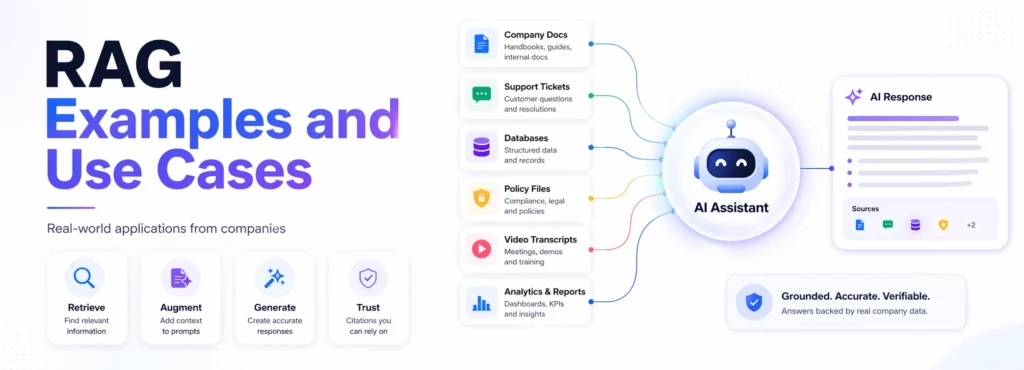
Large language models are powerful, but they have one big problem: they do not automatically know your latest documents, internal policies, product updates, customer history, or private company knowledge.
That is where Retrieval-Augmented Generation, or RAG, becomes useful.
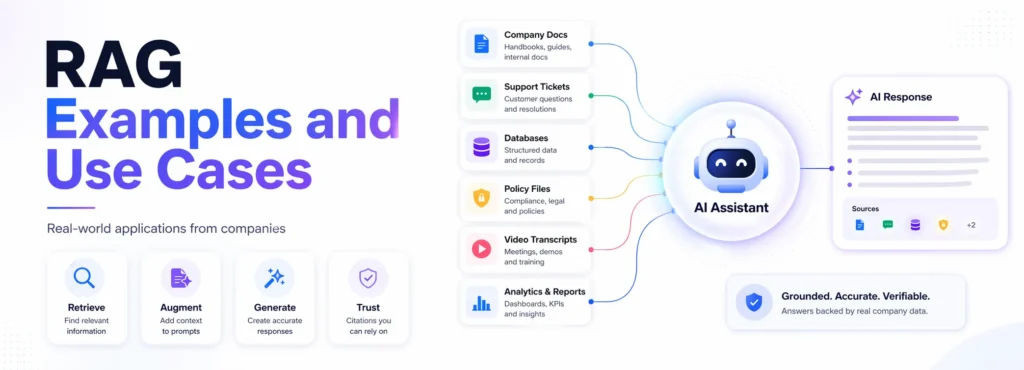
A normal LLM can sound confident even when it is missing context. A RAG system works differently. It first retrieves relevant information from trusted sources, such as documents, knowledge bases, databases, transcripts, policies, support tickets, or APIs, and then uses that context to generate a more grounded answer. AWS defines RAG as a process that improves LLM output by making the model reference an authoritative knowledge base outside its training data before generating a response.
In simple terms, RAG helps an AI assistant verify the correct source before it answers.
In this guide, we are not just listing RAG examples. For every example, you will see the company, use case, data source, RAG workflow, architecture pattern, business value, and the practical lesson you can use while building your own RAG system.
Best RAG examples
The best RAG examples include customer support chatbots, internal policy assistants, video Q&A systems, financial research assistants, fraud investigation tools, Text-to-SQL assistants, documentation bots, and enterprise knowledge search.
Companies like DoorDash, LinkedIn, Vimeo, Grab, Pinterest, Ramp, Morgan Stanley, Elastic, Uber, and Spotify use RAG-style systems to make LLM responses more accurate, current, and grounded in trusted data. DoorDash uses RAG in Dasher support automation; LinkedIn combines RAG with knowledge graphs for customer service QA; Vimeo uses RAG for video Q&A; and Uber improves its on-call copilot with enhanced agentic RAG.
What is RAG?
RAG, or Retrieval-Augmented Generation, is an AI architecture where a large language model retrieves relevant information from external sources before generating an answer.
The external sources can include:
- company documents
- help center articles
- internal wikis
- PDFs
- databases
- APIs
- support tickets
- video transcripts
- research reports
- policy documents
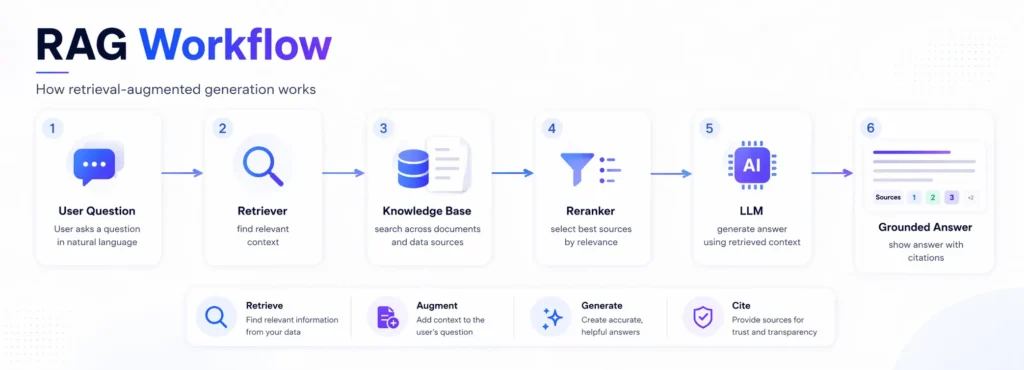
A simple RAG workflow looks like this:
- A user asks a question.
- The system searches trusted knowledge sources.
- Relevant documents or chunks are retrieved.
- The LLM receives the user question plus the retrieved context.
- The LLM generates an answer grounded in that context.
- The answer may include citations or source links.
This is why RAG is useful for business use cases where answers must be accurate, current, and based on approved information.
What changed in RAG in 2026?
RAG in 2026 is no longer just about connecting a chatbot to a vector database.
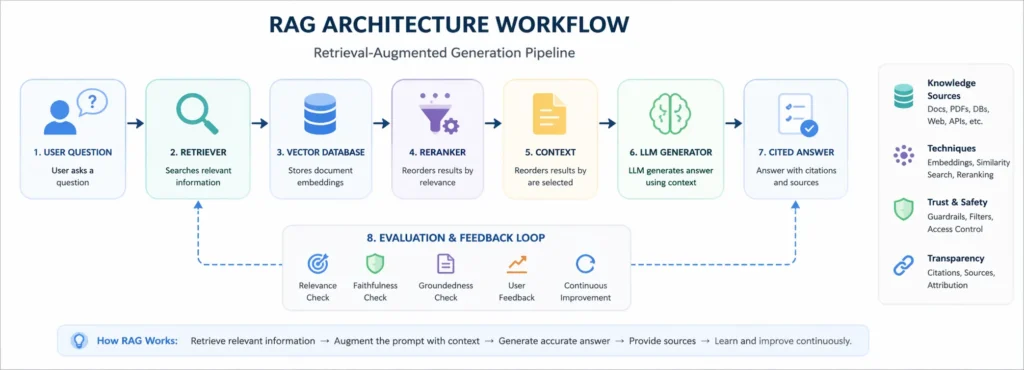
Companies are now building more advanced RAG systems with hybrid search, reranking, access controls, knowledge graphs, agentic workflows, multimodal retrieval, citations, guardrails, and continuous evaluation. Uber’s enhanced agentic RAG case is a good example of this shift: the company reported a relative 27% increase in acceptable answers and a relative 60% reduction in incorrect advice after moving from traditional RAG to enhanced agentic RAG.
The biggest shift is this:
RAG has moved from prototype to production.
Teams now care less about “Can this chatbot answer?” and more about:
- Can we trust the answer?
- Can we trace the source?
- Can we control permissions?
- Can we reduce hallucinations?
- Can we measure answer quality?
- Can we update the knowledge base continuously?
- Can the system work safely in real business workflows?
That is why many modern RAG examples include evaluation loops, guardrails, access control, and structured retrieval pipelines.
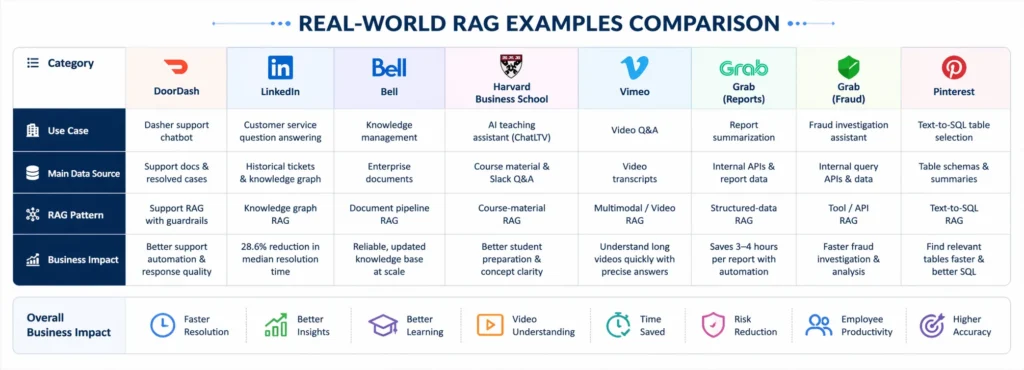
Quick comparison of RAG examples
| Finance/research | RAG use case | Industry | Main data source | RAG pattern |
|---|---|---|---|---|
| DoorDash | Dasher support chatbot | Food delivery | Support docs and resolved cases | Support RAG with guardrails |
| Customer service QA | Technology | Historical tickets and knowledge graph | Knowledge graph RAG | |
| Bell | Knowledge management | Telecom | Enterprise documents | Modular document pipeline RAG |
| Harvard Business School | AI teaching assistant | Education | Course material and Slack Q&A | Course-material RAG |
| Vimeo | Video Q&A | Media | Video transcripts | Multimodal/video RAG |
| Grab | Report summarization | Super-app / analytics | Internal APIs and reports | Structured-data RAG |
| Grab | Fraud investigation assistant | Super-app / risk | Internal query APIs | Tool/API RAG |
| Text-to-SQL table selection | Data / social | Table schemas and summaries | Text-to-SQL RAG | |
| Ramp | Industry classification | Fintech | Customer data and NAICS codes | Classification RAG |
| RBC | Internal policy search | Banking | Policy documents | Enterprise policy RAG |
| Morgan Stanley | Advisor knowledge assistant | Finance | Internal knowledge base | Financial knowledge RAG |
| Morgan Stanley Research | AskResearchGPT | Technology/media | Morgan Stanley Research | Research retrieval RAG |
| Elastic | ElasticGPT | Software | Internal company data | Employee assistant RAG |
| Uber | Genie on-call copilot | Engineering | Internal docs and Slack knowledge | Agentic/on-call RAG |
| Spotify | AiKA knowledge assistant | Technology / media | Internal knowledge sources | Employee knowledge RAG |
Our RAG use case score
This scoring table adds an original analysis layer. The score is based on four factors:
- Business value: How useful the RAG system is for the organization.
- Complexity: How hard it is to implement.
- Risk level: How dangerous wrong answers could be.
- Learning value: How useful the example is for teams building their own RAG system.
| Bell’s knowledge management | Business value | Complexity | Risk level | Learning value |
|---|---|---|---|---|
| DoorDash support chatbot | 9/10 | 8/10 | 8/10 | 9/10 |
| LinkedIn knowledge graph RAG | 9/10 | 9/10 | 7/10 | 10/10 |
| Grab the report summarization | 8/10 | 8/10 | 6/10 | 9/10 |
| Grab the report summarization | 7/10 | 6/10 | 5/10 | 8/10 |
| Vimeo video Q&A | 8/10 | 7/10 | 4/10 | 8/10 |
| Grab report summarization | 9/10 | 7/10 | 6/10 | 9/10 |
| Grab fraud investigation | 9/10 | 9/10 | 9/10 | 9/10 |
| Pinterest Text-to-SQL | 9/10 | 9/10 | 7/10 | 10/10 |
| Ramp industry classification | 8/10 | 8/10 | 6/10 | 8/10 |
| RBC policy search | 9/10 | 8/10 | 9/10 | 9/10 |
| Morgan Stanley advisor assistant | 10/10 | 9/10 | 10/10 | 9/10 |
| AskResearchGPT | 9/10 | 8/10 | 8/10 | 8/10 |
| ElasticGPT | 8/10 | 7/10 | 6/10 | 8/10 |
| Uber Genie | 10/10 | 9/10 | 8/10 | 10/10 |
| Spotify AiKA | 8/10 | 7/10 | 6/10 | 8/10 |
Best beginner inspiration: Vimeo, Harvard, Elastic
Best advanced inspiration: LinkedIn, Pinterest, Uber
Best enterprise inspiration: Morgan Stanley, RBC, Bell
Best analytics inspiration: Grab, Pinterest
Best support automation inspiration: DoorDash, Uber
How we selected these RAG examples
We selected these examples based on publicly available company engineering blogs, research papers, product announcements, technical case studies, and official company resources.
Each example was included only when there was enough information to explain:
- the business problem
- the data source
- The RAG workflow
- the architecture pattern
- The practical lesson for builders
This guide avoids weak or vague examples where a company only mentions “AI chatbot” without enough evidence of retrieval, grounding, or internal knowledge use.
15 real-world RAG examples and use cases
1. DoorDash: RAG chatbot for delivery support
DoorDash built an LLM-based Dasher support automation system using RAG, LLM Guardrail, LLM Judge, and quality evaluation. The goal was to improve automated support for Dashers when they face delivery-related problems.
Use case:
Delivery support chatbot for Dashers.
Data source:
Support knowledge base articles, deliver support documents, and historical resolved cases.
RAG workflow:
Dasher issue → conversation understanding → relevant article/case retrieval → LLM-generated answer → guardrail check → response or human escalation.
Business impact:
More consistent support automation and better response quality for delivery-related questions.
Architecture pattern:
Support RAG with guardrails and an LLM judge.
Builder lesson:
Customer-facing RAG should not rely only on retrieval. It also needs answer validation, escalation paths, quality monitoring, and policy checks.
Key takeaway:
A chatbot that gives fast answers is useful. A chatbot that gives fast, policy-safe, source-grounded answers is much more useful.
2. LinkedIn: Knowledge graph RAG for customer service
LinkedIn introduced a customer service question-answering method that combines RAG with knowledge graphs. Instead of treating past support tickets as simple text chunks, the system builds a knowledge graph that preserves issue structure and relationships between tickets. The paper reports that the method reduced median per-issue resolution time by 28.6% after deployment in LinkedIn’s customer service team.
Use case:
Customer service question answering.
Data source:
Historical issue tracking tickets, customer service records, and relationships between past issues.
RAG workflow:
Customer query → query parsing → related sub-graph retrieval → context generation → LLM answer.
Business impact:
Faster issue resolution and improved retrieval accuracy.
Architecture pattern:
Knowledge graph RAG.
Builder lesson:
When relationships matter, plain vector search may not be enough. For complex tickets, policies, cases, or incidents, graph-based retrieval can help preserve context.
Key takeaway:
Sometimes the answer is not hidden in one document. It is hidden in the relationship between many records.
3. Bell: Modular knowledge management for RAG systems
Bell built modular document embedding pipelines for knowledge management at scale. The system supports document processing, ingestion, indexing, batch updates, incremental updates, and automatic index updates when documents are added or removed.
Use case:
Enterprise knowledge management for RAG applications.
Data source:
Internal documents, company knowledge bases, and raw enterprise files.
RAG workflow:
Document ingestion → preprocessing → chunking → embedding → indexing → batch/incremental updates → retrieval for RAG apps.
Business impact:
More reliable and updated knowledge bases for internal RAG applications.
Architecture pattern:
Modular document pipeline RAG.
Builder lesson:
Most RAG projects do not fail because the LLM is weak. They fail because the document pipeline is messy.
Key takeaway:
A beautiful AI assistant on top of outdated documents is still an outdated assistant.
4. Harvard Business School: ChatLTV AI teaching assistant
Harvard Business School Senior Lecturer Jeffrey Bussgang introduced ChatLTV, a specialized chatbot embedded into the course Slack channel for his entrepreneurship course. Harvard describes ChatLTV as a specialized chatbot used to enhance student course preparation. Bussgang also explained that ChatLTV used the course corpus, including case studies, teaching notes, books, blog posts, and historical Slack Q&A, with roughly 200 documents and 15 million words in the corpus.
Use case:
AI teaching assistant for course preparation.
Data source:
Course materials, teaching notes, books, blog posts, and historical Slack Q&A.
RAG workflow:
Student question → course corpus retrieval → relevant context passed to LLM → answer in course context.
Business impact:
Students can prepare better for class discussions and clarify concepts using course-specific material.
Architecture pattern:
Course material RAG.
Builder lesson:
Education RAG works best when the assistant is grounded in approved learning material, not general internet knowledge.
Human takeaway:
A good AI tutor should not just be smart. It should understand the class, the material, and the teacher’s expectations.
5. Vimeo: Video Q&A with RAG
Vimeo built a video Q&A system using RAG. The system converts video into transcripts, processes the transcript, retrieves relevant segments, and allows users to ask questions about video content. Vimeo’s engineering blog also notes video-specific challenges such as speaker detection and long-context retrieval.
Use case:
Conversational Q&A over videos.
Data source:
Video transcripts, speaker information, and video context.
RAG workflow:
Video transcript → chunking and indexing → user question → relevant transcript retrieval → LLM answer → timestamp or video moment support.
Business impact:
Users can understand long videos without watching everything manually.
Architecture pattern:
Video transcript RAG / multimodal RAG.
Builder lesson:
For the video RAG, answers should connect back to moments in the video. Without timestamps, the answer is less useful.
Key takeaway:
RAG can turn a one-hour video into something users can search, question, and navigate in seconds.
6. Grab: Report summarization with RAG-powered LLMs
Grab uses RAG-powered LLMs for analytical tasks, including report summarization. Its Report Summarizer calls a Data-Arks API to generate tabular data, and the LLM summarizes the key insights. Grab says this automated report generation saves an estimated 3–4 hours per report.
Use case:
Automated report summarization.
Data source:
Internal APIs, SQL query outputs, and report data.
RAG workflow:
Scheduled report request → Data-Arks API call → data retrieval → LLM summarization → Slack delivery.
Business impact:
Less manual report writing and faster insight delivery.
Architecture pattern:
Structured-data RAG.
Builder lesson:
RAG is not only for documents. It can also retrieve structured data from APIs and databases.
Key takeaway:
If your team spends hours every week writing the same reports, RAG can turn raw data into readable summaries.
7. Grab: Fraud investigation assistant
Grab also built an AI assistant for analytical and fraud investigation workflows. The system uses internal APIs and RAG to select relevant queries, execute them, and summarize results for users through Slack.
Use case:
Fraud investigation and analytical self-service.
Data source:
Internal query APIs, fraud investigation data, and operational datasets.
RAG workflow:
User prompt → relevant query/API retrieval → execution → result summarization → Slack response.
Business impact:
Analysts can investigate faster without manually searching for every query or dataset.
Architecture pattern:
Tool/API RAG.
Builder lesson:
In analytical workflows, RAG can retrieve tools, not just text. It can help the system choose the right internal API or query.
Key takeaway:
The real value is not just answering a question. It is knowing which system to ask first.
8. Pinterest: RAG for Text-to-SQL table selection
Pinterest built a Text-to-SQL system and used RAG to help users select the right tables. Pinterest explained that identifying the correct tables among hundreds of thousands in a data warehouse was a major challenge, so it integrated RAG for table selection.
Use case:
Text-to-SQL assistance and table discovery.
Data source:
Table schemas, table summaries, and data warehouse metadata.
RAG workflow:
User question → table-summary embeddings → similarity search → top table candidates → LLM table selection → SQL generation.
Business impact:
Users can find relevant tables faster and generate better SQL queries.
Architecture pattern:
Text-to-SQL RAG.
Builder lesson:
For data teams, the hardest part is often not generating SQL. It is finding the right data source.
Key takeaway:
A Text-to-SQL assistant is only as good as the tables it understands.
9. Ramp: Industry classification with RAG
Ramp built an in-house industry classification model using RAG to improve how it understands and classifies customers. The company used Retrieval-Augmented Generation to move toward a standardized classification system, including NAICS-based classification.
Use case:
Customer industry classification.
Data source:
Customer business information, company descriptions, and NAICS code data.
RAG workflow:
Customer information → vector representation → similarity matching with industry codes → LLM prediction → classification output.
Business impact:
Cleaner customer segmentation and more consistent industry classification.
Architecture pattern:
Classification RAG.
Builder lesson:
RAG can be used for classification, not just chat. It is useful when free-text business data needs to be mapped to a structured taxonomy.
Key takeaway:
When categories are fuzzy, RAG can help connect messy real-world descriptions to standardized labels.
10. RBC: Arcane for internal policy search
Royal Bank of Canada developed Arcane, an internal RAG system designed to help specialists locate relevant investment policies across internal platforms. The public session description explains that Arcane points specialists to relevant policies scattered across internal rag as a services platform in seconds.
Use case:
Internal investment policy search.
Data source:
Internal policy documents and web-based knowledge repositories.
RAG workflow:
Specialist question → internal policy retrieval → relevant policy extraction → concise answer with source context.
Business impact:
Faster access to policy information in a regulated environment.
Architecture pattern:
Enterprise policy RAG.
Builder lesson:
For banking and finance, source attribution is not optional. Every answer should point back to the relevant approved policy.
Key takeaway:
In regulated industries, a confident answer without a source is not enough.
11. Morgan Stanley: AI knowledge assistant for financial advisors
Morgan Stanley Wealth Management embedded GPT-4 into workflows to help financial advisors access the firm’s knowledge base and respond to client needs. OpenAI describes the work as helping advisors access internal knowledge more effectively, with a strong evaluation framework for reliability. Morgan Stanley also said its wealth management AI work uses GPT-4 to generate responses exclusively from internal Morgan Stanley content, with appropriate controls.
Use case:
Financial advisor knowledge assistant.
Data source:
Internal Morgan Stanley content, research, and knowledge base material.
RAG workflow:
Advisor query → internal content retrieval → GPT-4 response generation → controlled answer for advisor use.
Business impact:
Advisors can find internal knowledge faster and respond to client needs more efficiently.
Architecture pattern:
Financial knowledge-base RAG.
Builder lesson:
In finance, RAG must include access controls, evaluation, compliance review, and careful source grounding.
Key takeaway:
Enterprise RAG is not only about speed. It is about giving employees safe access to approved knowledge.
12. Morgan Stanley Research: AskResearchGPT
Morgan Stanley Research launched AskResearchGPT, a generative AI-powered assistant for Investment Banking, Sales & Trading, and Research staff. The assistant helps staff surface and distill insights from the expansive body of Morgan Stanley Research.
Use case:
Research discovery and summarization.
Data source:
Morgan Stanley Research content.
RAG workflow:
Staff question → research library retrieval → relevant insight extraction → summarized answer.
Business impact:
Employees can navigate large research libraries faster and extract useful insights more efficiently.
Architecture pattern:
Research retrieval RAG.
Builder lesson:
Research RAG must preserve nuance. Summaries should not oversimplify complex analysis, forecasts, or assumptions.
Key takeaway:
RAG can make a large research library feel like an expert you can ask questions.
13. Elastic: ElasticGPT employee assistant
Elastic built ElasticGPT, a generative AI employee assistant based on a RAG framework. Elastic explains that the system uses SmartSource, a private, internally built RAG model that retrieves relevant context from internal data sources and passes it to an OpenAI LLM, using Elasticsearch for vector search and data storage.
Use case:
Employee knowledge assistant.
Data source:
Internal company data and knowledge sources.
RAG workflow:
Employee query → SmartSource retrieval → internal context selection → OpenAI LLM answer → employee-facing response.
Business impact:
Employees can access internal information faster and summarize work-related knowledge more easily.
Architecture pattern:
Employee assistant RAG.
Builder lesson:
Internal RAG systems must respect security, permissions, and source boundaries.
Human takeaway:
The best internal AI assistant should not know everything. It should know what the employee is allowed to access.
14. Uber: Genie on-call copilot and enhanced agentic RAG
Uber built Genie, a generative AI on-call copilot for engineering support. Uber later improved Genie with enhanced agentic RAG, reporting a relative 27% increase in acceptable answers and a relative 60% reduction in incorrect advice after moving from traditional RAG to enhanced agentic RAG.
Use case:
Engineering on-call support assistant.
Data source:
Internal engineering documentation, support knowledge, Slack channels, and internal knowledge systems.
RAG workflow:
Engineer question → internal source retrieval → source-grounded prompt → LLM answer → feedback and evaluation loop.
Business impact:
Faster engineering support and reduced dependency on human on-call responders for repeat questions.
Architecture pattern:
Agentic RAG / on-call support RAG.
Builder lesson:
Basic RAG may not be enough for complex engineering support. Agentic RAG can improve retrieval, document processing, and answer quality.
Key takeaway:
The next stage of RAG is not just retrieving documents. It is building systems that can reason through retrieval steps more carefully.
15. Spotify: AiKA, an AI knowledge assistant
Spotify’s Backstage documentation describes AiKA as an AI Knowledge Assistant designed to interact conversationally with company systems and tools. Spotify also says AiKA uses an agentic approach for advanced reasoning and multi-step problem solving, integrating with TechDocs and the Software Catalog through Portal Actions.
Spotify’s Backstage marketing page also describes AiKA as using retrieval-augmented generation to make its internal chatbot accurate and fast.
Use case:
Internal knowledge assistant for employees and developers.
Data source:
TechDocs, software catalog data, and internal knowledge sources.
RAG workflow:
Employee query → internal knowledge retrieval → context-aware answer generation → action or follow-up.
Business impact:
Employees can navigate company-specific information more easily.
Architecture pattern:
Enterprise employee knowledge RAG.
Builder lesson:
Internal knowledge assistants are valuable when company information is scattered across docs, Slack, tools, and internal systems.
Key takeaway:
RAG is useful when employees do not just need an answer — they need the right internal answer.
Which RAG example should you copy?
You should not copy a RAG system only because it looks advanced. Copy the example that matches your business problem, data type, and risk level.
| Your goal | Best example to study | Strong support for automation with guardrails and evaluation |
|---|---|---|
| Build a customer support bot | DoorDash | Build an internal document search |
| Improve ticket or case resolution | Shows how knowledge graphs help when relationships matter | |
| Build an employee AI assistant | Bell or Elastic | Strong examples of enterprise knowledge retrieval |
| Build an education assistant | Harvard ChatLTV | Good model for course-specific or training-specific RAG |
| Make videos searchable | Vimeo | Clear example of transcript-based RAG |
| Automate reports | Grab | Good pattern for structured-data retrieval and summarization |
| Support fraud or risk analysis | Grab | Shows how RAG can retrieve APIs and queries |
| Build a data assistant | Strong example of Text-to-SQL and table selection | |
| Classify messy business data | Ramp | Good example of RAG for classification |
| Build policy search | RBC | Useful for regulated industries |
| Build financial research tools | Morgan Stanley | Strong enterprise finance example |
| Build engineering support, copilot | Elastic or Spotify | Good for internal knowledge and developer workflows |
| Build engineering support copilot | Uber | Best advanced example of agentic RAG |
My recommendation:
If this is your first RAG project, do not start with fraud investigation, financial research, or agentic RAG. Start with a documentation assistant, internal policy search, or support assistant because the data is easier to control, and the evaluation is simpler.
Key lessons from these RAG examples
These real-world RAG examples show a clear pattern.
The strongest systems are not simple chatbots. They are complete knowledge workflows.
| Lesson | Why it matters |
|---|---|
| RAG needs trusted data | Bad sources create bad answers |
| Retrieval quality matters | The LLM cannot fix irrelevant context |
| Citations build trust | Users need to verify answers |
| Access control is critical | Internal RAG must respect permissions |
| Evaluation is required | RAG quality changes over time |
| Guardrails reduce risk | Customer-facing and regulated use cases need safety checks |
| RAG can retrieve tools | Some systems retrieve APIs or queries, not just documents |
| RAG works beyond chat | Classification, reports, video Q&A, and analytics are all valid use cases |
Best RAG use cases by industry
| Industry | Support chatbot, agent assist, ticket summarization, and refund-policy answers |
|---|---|
| Customer support | Support chatbot, agent assist, ticket summarization, refund-policy answers |
| Finance | Policy search, research assistant, fraud investigation, compliance Q&A |
| Education | AI tutor, course assistant, student Q&A, research helper |
| Healthcare | Clinical guideline search, patient-document assistant, medical literature Q&A |
| Legal | Contract search, legal research, compliance assistant, policy comparison |
| Ecommerce | Product Q&A, return-policy chatbot, personalized recommendations |
| SaaS | Documentation assistant, onboarding bot, developer support chatbot |
| Data teams | Text-to-SQL, metric explanation, table discovery, dashboard Q&A |
| HR | Employee handbook assistant, benefits Q&A, onboarding assistant |
| Engineering | Codebase Q&A, runbook assistant, incident search, on-call support |
Best RAG use cases by business function
| Business function | RAG use case |
|---|---|
| Customer support | Help-center chatbot, agent assist, ticket resolution |
| Sales | Product Q&A, proposal assistant, competitive battlecards |
| Marketing | Brand guideline assistant, content research, campaign knowledge base |
| HR | Employee handbook assistant, benefits Q&A, onboarding bot |
| Legal | Contract review, policy search, legal research |
| Finance | Report summarization, compliance search, fraud investigation |
| Data teams | Text-to-SQL, metric explanation, dashboard Q&A |
| Product teams | User feedback analysis, release-note assistant, documentation bot |
| Engineering | Codebase Q&A, incident search, runbook assistant |
RAG architecture examples
Not every RAG system uses the same architecture. The right design depends on the data source, risk level, user experience, and business goal.
1. Basic vector RAG
Basic vector RAG is the simplest approach.
Documents are chunked, embedded, stored in a vector database, retrieved by similarity, and passed to the LLM.
Best for:
- FAQ bots
- documentation assistants
- internal knowledge search
- simple support use cases
2. Hybrid search RAG
Hybrid RAG combines keyword search with vector search.
This is useful when exact terms matter.
Best for:
- legal search
- policy lookup
- technical support
- error-code search
- product documentation
3. Knowledge graph RAG
Knowledge graph RAG retrieves entities and relationships, not just text chunks.
LinkedIn’s customer service system is a strong example because it uses relationships between support issues to improve retrieval.
Best for:
- customer support tickets
- fraud networks
- medical knowledge
- legal research
- compliance domains
4. Text-to-SQL RAG
Text-to-SQL RAG retrieves relevant schemas, table summaries, and metadata before generating SQL.
Pinterest used this approach to help users identify the right tables in a large data warehouse.
Best for:
- analytics teams
- BI assistants
- metric exploration
- data warehouse search
5. Tool/API RAG
Tool/API RAG retrieves the right tool, query, or API instead of only retrieving documents.
Grab’s analytical workflows show how RAG can call internal APIs and summarize outputs.
Best for:
- reporting
- fraud investigation
- internal automation
- operational workflows
6. Multimodal RAG
Multimodal RAG retrieves from videos, audio, images, PDFs, transcripts, or mixed media.
Vimeo’s video Q&A system is an example of transcript-based video RAG.
Best for:
- video libraries
- meeting recordings
- training content
- product demos
- visual documentation
7. Agentic RAG
Agentic RAG uses agents to improve retrieval, query handling, document processing, or answer validation.
Uber’s enhanced agentic RAG improved acceptable answers and reduced incorrect advice compared with its previous RAG setup.
Best for:
- engineering support
- complex internal workflows
- multi-step Q&A
- high-risk knowledge tasks
RAG pipeline: key components
A production RAG pipeline usually includes more than embeddings and a chatbot.
| Component | Splits long content into smaller, retrievable sections |
|---|---|
| Data ingestion | Collects documents, tickets, transcripts, policies, or database records |
| Cleaning | Removes duplicates, outdated pages, broken formatting, and irrelevant content |
| Chunking | Combines the user query and retrieved context |
| Metadata | Adds title, date, author, department, product, permission level, and content type |
| Embeddings | Converts text into vector representations |
| Vector database | Stores embeddings for semantic search |
| Retriever | Finds relevant chunks for a user query |
| Reranker | Reorders retrieved results based on relevance |
| Prompt template | Combines the user query and the retrieved context |
| LLM generator | Produces the final answer |
| Citations | Shows where the answer came from |
| Guardrails | Checks safety, policy, and hallucination risks |
| Evaluation | Measures retrieval quality and answer correctness |
| Monitoring | Tracks latency, cost, feedback, and production failures |
A simple demo can skip some of these steps. A production system cannot.
How to build a RAG system
Step 1: Choose a narrow business problem
Do not start with:
“We want an AI chatbot for everything.”
Start with:
“We want a support assistant that answers refund-policy questions using our latest help center and internal SOPs.”
A narrow use case is easier to evaluate, safer to launch, and more likely to succeed.
Step 2: Identify trusted data sources
Your RAG system is only as reliable as its sources.
Possible sources include:
- help center articles
- PDFs
- internal wikis
- customer tickets
- product documentation
- policy documents
- CRM records
- SQL databases
- Slack or Teams knowledge
- video transcripts
- research libraries
Step 3: Clean the data
Remove outdated files, duplicates, broken formatting, irrelevant pages, and conflicting information.
Most RAG failures begin here.
Step 4: Chunk the documents
Chunking means splitting long documents into smaller sections.
Good chunks should be:
- complete enough to answer a question
- small enough to fit into context
- connected to metadata
- easy to cite
Step 5: Add metadata
Metadata improves filtering and retrieval.
Useful metadata includes:
- document title
- author
- last updated date
- department
- product
- region
- permission level
- content type
- policy version
Step 6: Create embeddings
Embeddings convert text into numerical representations. This helps the system find similar meaning, even when the user uses different words.
For example, the system may connect “refund delay” with “payment reversal timeline.”
Step 7: Store data in a searchable index
Use a vector database, search engine, or hybrid search system.
The goal is simple: retrieve the right context quickly.
Step 8: Retrieve and rerank context
When a user asks a question, retrieve the most relevant chunks.
For complex systems, add:
- query rewriting
- metadata filtering
- reranking
- permission checks
- freshness checks
- source quality scoring
Step 9: Generate the answer
The LLM should receive the user query plus the retrieved context.
The prompt should instruct the model to:
- Answer only from the provided sources
- cite sources
- Say when information is missing
- avoid guessing
- follow policy rules
Step 10: Evaluate and monitor
Track:
- retrieval relevance
- answer accuracy
- hallucination rate
- source quality
- citation quality
- escalation rate
- latency
- cost per answer
- user satisfaction
How to evaluate RAG systems
RAG evaluation should test both retrieval and generation.
| Evaluation area | What to measure |
|---|---|
| Retrieval quality | Did the system retrieve the right documents? |
| Context relevance | Is the retrieved context useful? |
| Faithfulness | Is the answer supported by the retrieved source? |
| Correctness | Is the final answer factually accurate? |
| Completeness | Did the answer fully address the question? |
| Citation quality | Are sources clear and relevant? |
| Safety | Did the answer violate policy or compliance rules? |
| Latency | Did the answer arrive fast enough? |
| User experience | Did the user find it helpful? |
A common mistake is evaluating only the final answer.
But if retrieval is bad, the LLM is already working with a weak context.
For production systems, evaluate the full pipeline:
query understanding
→ retrieval
→ reranking
→ generation
→ citation
→ feedback
→ monitoring
RAG vs fine-tuning
RAG and fine-tuning solve different problems.
| Factor | RAG | Answer from the latest company policy |
|---|---|---|
| Best for | Fresh, private, changing knowledge | Style, format, behavior, task pattern |
| Data updates | Update the knowledge base | Retraining may be needed |
| Source citations | Easier to provide | Not naturally available |
| Use case | Can be costly depending on the model and data | Write in a specific brand voice |
| Cost profile | Often easier for knowledge updates | Can be costly depending on model and data |
| Risk | Retrieval quality matters | Training data quality matters |
Use RAG when the model needs access to current, private, or source-backed information.
Use fine-tuning when the model needs to behave in a specific way, follow a format, or perform a repeated task pattern.
In many enterprise systems, the best answer is not RAG or fine-tuning. It is both: RAG for knowledge, fine-tuning, or prompting for behavior.
When RAG may not be the right choice
RAG is powerful, but it is not always the best solution.
You may not need RAG if:
- The task does not require external knowledge
- The answer does not change over time
- The model only needs a specific writing style
- Your data is too messy or unreliable
- You cannot maintain the knowledge base
- You do not need citations or source grounding
- A simple database query would work better
- A rules-based workflow is safer
In these cases, prompt engineering, fine-tuning, traditional search, rules-based automation, or a simple database lookup may be enough.
Common RAG mistakes to avoid
- Uploading messy documents and expecting clean answers
- Using chunks that are too large or too small
- Ignoring metadata
- Not checking source freshness
- Letting the LLM answer without citations
- Not testing retrieval quality separately
- Forgetting user permissions
- Treating RAG as a one-time setup
- Measuring only answer quality, not retrieval quality
- Building a broad chatbot instead of a focused use case
The biggest mistake is assuming RAG is “just search plus an LLM.”
It is not.
A reliable RAG system is a knowledge product. It needs clean data, thoughtful retrieval, source control, evaluation, monitoring, and continuous improvement.
RAG use case selection matrix
Before building your own RAG system, compare use cases by business value, complexity, and risk.
| RAG use case | Business value | Complexity | Risk level |
|---|---|---|---|
| Documentation chatbot | High | Low | Low |
| Customer support assistant | High | Medium | Medium |
| Internal policy search | High | Medium | High |
| Financial research assistant | High | High | High |
| Fraud investigation assistant | High | High | High |
| Video Q&A | Medium | Medium | Low |
| Text-to-SQL assistant | High | High | Medium |
| HR assistant | Medium | Low | Medium |
| Legal research assistant | High | High | High |
| Report summarizer | High | Medium | Medium |
Best starting point: choose a use case with high business value, clean data, low-to-medium risk, and measurable success metrics.
RAG use case template
Use this template before building your own RAG system.
| Question | Example answer |
|---|---|
| What user problem are we solving? | Support agents need faster access to policy answers |
| What data source will RAG retrieve from? | Help center, SOPs, internal policy docs |
| How often does the data change? | Weekly |
| Does the answer need citations? | Yes |
| What is the risk level? | Medium to high |
| Who can access the data? | Support team only |
| What metric will prove success? | Lower resolution time, higher answer accuracy |
| What fallback is needed? | Escalate to a human agent |
RAG and AI search visibility
RAG is important for product teams, but the same principles also matter for SEO and generative search.
If you want content to appear in AI Overviews, AI Mode, or generative search results, you need content that is:
- crawlable
- structured
- source-backed
- clearly written
- entity-rich
- updated
- useful to humans
- easy to extract into direct answers
Google says its normal SEO best practices remain relevant for AI features like AI Overviews and AI Mode, with no special extra requirements for appearing in AI Overviews or AI Mode.
For ChatGPT search visibility, OpenAI says OAI-SearchBot is used to surface websites in ChatGPT search features, and sites that opt out of OAI-SearchBot will not be shown in ChatGPT search answers.
FAQs about RAG examples and use cases
What is a RAG example?
A RAG example is an AI system that retrieves relevant information from a trusted source before generating an answer. For example, a customer support chatbot can retrieve help-center articles or internal policies before replying to a user.
What are the best RAG use cases?
The best RAG use cases include customer support chatbots, internal knowledge search, policy assistants, legal research, financial research, fraud investigation, report summarization, Text-to-SQL, video Q&A, and documentation assistants.
How does RAG work with LLMs?
RAG works by giving an LLM extra context before it answers. The system retrieves relevant documents, chunks, tables, or API results and passes that information into the model prompt. The LLM then generates an answer based on the retrieved context.
Is RAG only used for chatbots?
No. RAG is often used for chatbots, but it can also power document search, report summarization, Text-to-SQL, policy discovery, fraud investigation, video Q&A, research assistants, and enterprise knowledge systems.
What is the simplest RAG example?
The simplest RAG example is a documentation chatbot that retrieves relevant help articles before answering a user’s question.
What is an enterprise RAG example?
An enterprise RAG example is an internal AI assistant that retrieves information from company documents, policies, tickets, or databases while respecting user permissions and showing source citations.
What is the difference between RAG and semantic search?
Semantic search finds relevant information. RAG goes one step further by using that retrieved information as context for an LLM to generate an answer.
Is RAG better than fine-tuning?
RAG is better when the model needs current, private, or source-backed information. Fine-tuning is better when you want to change the model’s style, behavior, or task pattern. Many production systems use both.
Which companies use RAG?
Companies and organizations using RAG-style systems include DoorDash, LinkedIn, Bell, Harvard Business School, Vimeo, Grab, Pinterest, Ramp, RBC, Morgan Stanley, Elastic, Uber, and Spotify.
What data sources can RAG use?
RAG can use documents, PDFs, help centers, knowledge bases, tickets, databases, APIs, table schemas, transcripts, research libraries, internal wikis, and policy documents.
What is the biggest challenge in RAG?
The biggest challenge is usually retrieval quality. If the system retrieves the wrong context, the answer will be weak even if the LLM is powerful.
Conclusion
RAG has moved far beyond simple chatbots.
The best RAG examples today show companies using retrieval-augmented generation for customer support, internal knowledge search, education, video understanding, financial research, fraud investigation, report generation, enterprise search, data analytics, engineering support, and employee productivity.
The main lesson is simple:
A reliable RAG application needs clean data, smart retrieval, metadata, citations, permissions, guardrails, evaluation, and continuous updates.
When these pieces work together, RAG can turn scattered company knowledge into useful, trustworthy AI experiences.
For teams building AI applications in 2026, RAG is one of the most practical ways to make LLMs more accurate, useful, and business-ready.
About the author


Popular Posts
AI Transformation Strategy: How Businesses Build Intelligent AI-Powered Systems
August 26, 2026- 8 Min Read